
Download Spoon CR – food delivery, restaurant app, loyalty rewards, discounts, menu access, mobile ordering
Overview
Spoon CR is a mobile application designed to streamline the experience of ordering food and drinks for users seeking convenience, value, and engagement. Developed by Justo App, the app serves as a digital gateway to menus, exclusive promotions, and a loyalty rewards program known as SPOONERS. It is tailored for consumers who enjoy dining out or ordering in and wish to stay informed about current offers while earning rewards for their purchases.
The app supports mobile ordering, allowing users to browse available items, place orders, and track deliveries directly from their smartphones. Its primary purpose is to enhance user engagement with participating restaurants by integrating real-time discounts, personalized promotions, and a points-based system. The target audience includes food and drink enthusiasts, regular diners, and individuals looking to maximize savings through digital convenience.
While the developer did not provide additional information about the company’s background or broader product portfolio, the app’s functionality suggests a focus on user retention and customer loyalty within the food service sector. Real-world usage scenarios include daily lunch orders, weekend meal planning, and participating in seasonal promotions. The app’s design emphasizes simplicity, making it accessible to users of varying tech proficiency.
Key Features & Capabilities
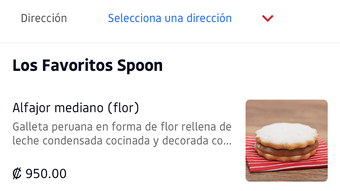
- Menu Access: Users can view detailed digital menus from partner restaurants, including descriptions, prices, and availability, enabling informed and efficient ordering.
- Discounts and Promotions: The app delivers real-time updates on current deals, limited-time offers, and seasonal discounts, helping users save on their favorite meals.
- SPOONERS Loyalty Program: A built-in rewards system allows users to earn points with each purchase, which can be redeemed for free items or exclusive perks.
- Mobile Ordering: The app supports full-order placement from mobile devices, reducing wait times and improving convenience for both casual and frequent users.
- Push Notifications: Users receive timely alerts about new promotions, order status updates, and rewards milestones, enhancing engagement and retention.
These features collectively support a seamless experience for users who value efficiency, affordability, and long-term benefits. For example, a user ordering lunch daily can accumulate points through SPOONERS and eventually redeem them for a free meal. Similarly, a customer planning a weekend dinner can check for active discounts before placing an order. The integration of real-time updates ensures users are always aware of the latest offerings, making the app a practical tool for budget-conscious and convenience-driven consumers.
User Interface, Workflow & Performance
The user interface of Spoon CR is designed with simplicity and functionality in mind. Navigation is intuitive, allowing users to access menus, promotions, and their loyalty account with minimal effort. The layout prioritizes key actions such as browsing items, adding to cart, and placing orders, which contributes to a smooth workflow.
Users can filter items by category, search for specific dishes, and view order history without unnecessary steps. The app’s performance is consistent with typical mobile applications in the food delivery space, though exact performance details were not specified. The developer did not provide information on resource usage, so CPU or RAM behavior remains unknown.
Stability appears to be maintained at a baseline level, as the app functions as intended within standard mobile environments. However, performance may vary depending on device capabilities and network conditions. General observations suggest that the app loads quickly and responds promptly to user inputs, which supports a positive user experience.
The absence of reported crashes or bugs in the available documentation indicates a stable release. Overall, the app balances visual clarity with operational efficiency, making it suitable for users who prefer straightforward digital interactions.
Compatibility & System Requirements
Spoon CR is designed for Android devices and is compatible with the latest versions of the operating system. The app has a file size of 24.5 MB, which is relatively lightweight and suitable for most smartphones and tablets. It is available for download on Android platforms, though specific version requirements were not listed.
The developer did not specify exact system requirements, such as minimum RAM, processor speed, or storage space needed for optimal performance. Compatibility information was partially provided, indicating that the app is intended for Android users but without further technical details. Users should ensure their device meets standard Android requirements for app installation and operation.
The absence of information regarding iOS or other platforms suggests that the app is currently exclusive to Android. Installation is straightforward, and the app integrates with standard Android security protocols. For users with older devices, performance may vary, but no specific limitations were mentioned.
Pros and Cons
Pros
- Free to download and use with no upfront cost.
- Intuitive interface designed for quick and easy navigation.
- Offers real-time access to menus and exclusive discounts.
- Includes a loyalty rewards program (SPOONERS) for long-term savings.
- Supports mobile ordering for faster and more convenient service.
Cons
- Platform availability is limited to Android only.
- Exact system requirements were not specified.
- Performance data, such as CPU or RAM usage, was not provided.
- Limited information about the developer’s broader product offerings.
- Availability of features may depend on regional restaurant partnerships.
FAQ Section
Is Spoon CR available for iOS devices?
As of the current release, Spoon CR is only available for Android. There is no official iOS version listed.
Is the app secure to use?
Spoon CR is developed by Justo App and is designed to protect user data through standard mobile security practices. However, no specific security certifications or privacy policies were provided in the available information.
How often does the app receive updates?
The app has been updated to version 1.0.1, but the frequency of future updates has not been disclosed by the developer.
What type of license does Spoon CR use?
Spoon CR is offered as a free application. The licensing model is not explicitly stated, but it operates under a standard freemium framework with in-app rewards and promotions.
Can I use Spoon CR offline?
While the app allows users to view previously loaded menus and order history, full functionality requires an active internet connection for real-time updates, promotions, and order placement.
Final Thoughts + CTA
Spoon CR presents a compelling option for Android users seeking a convenient, rewarding, and cost-effective way to order food and drinks. With its clean interface, real-time access to discounts, and the SPOONERS loyalty program, the app delivers tangible benefits for regular users. Although it is currently limited to Android and lacks detailed technical specifications, its core features are well-executed and aligned with modern mobile ordering expectations.
The app is ideal for food enthusiasts, budget-conscious shoppers, and anyone who values digital convenience and long-term savings. For those looking to streamline their dining experience while earning rewards, Spoon CR offers a solid foundation. Download Spoon CR now and start enjoying your favorite meals with added value.







